Time interpolation using nowcasting
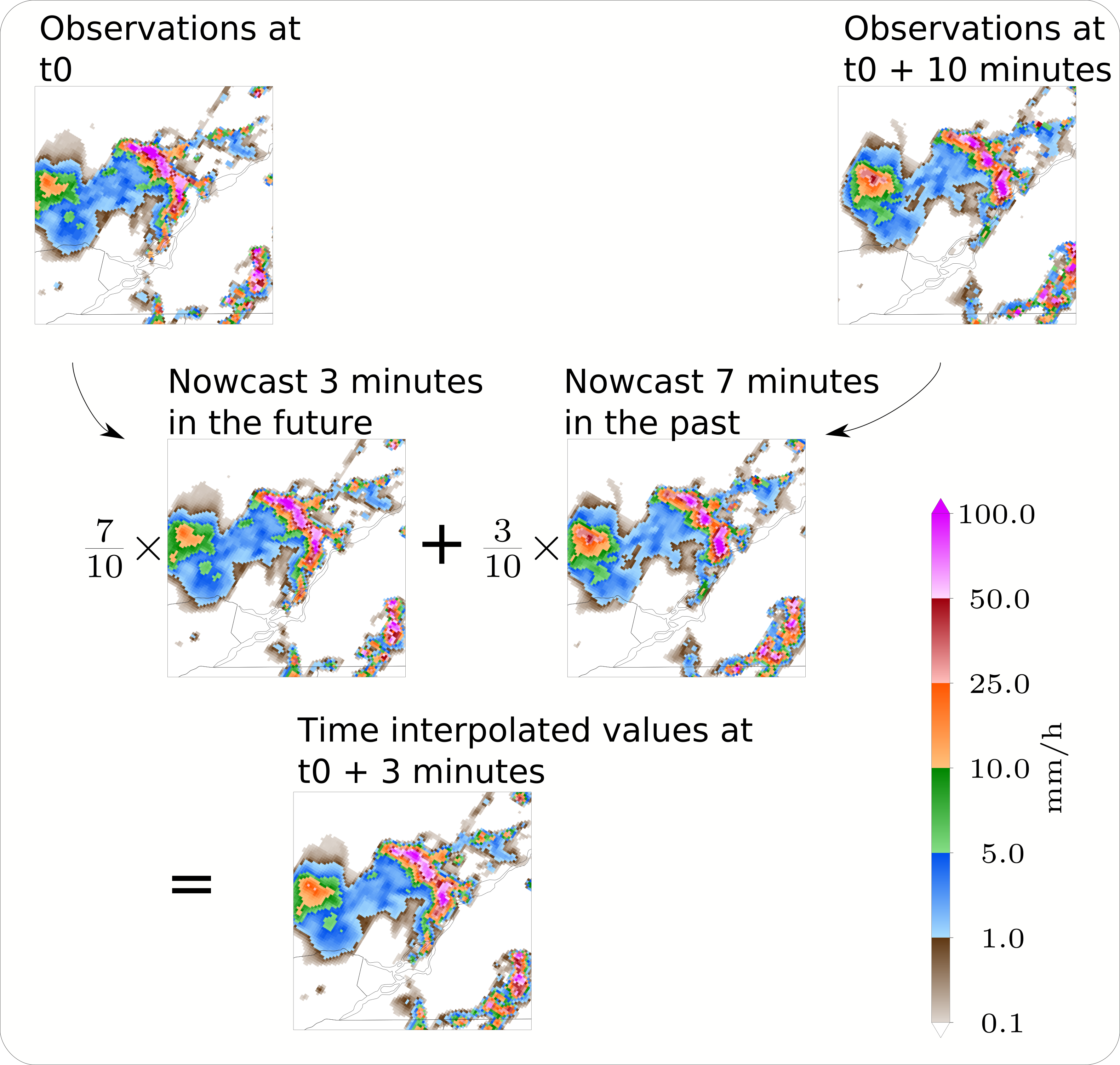
Sometimes, you need reflectivity or precipitation-rates at moments in time that do not match exactly with the time at which observational data is available. Simple linear interpolation between two fields at different times will not do a goot job because of precipitation displacement.
As a solution to this, the module obs_process provides a nowcast interpolation functionality. The basic idea is that data at intermediate timesteps, data is estimated as a weighted average of the forward advection of the observations before and backward advection of the observations after.
Interpolate a batch of observations
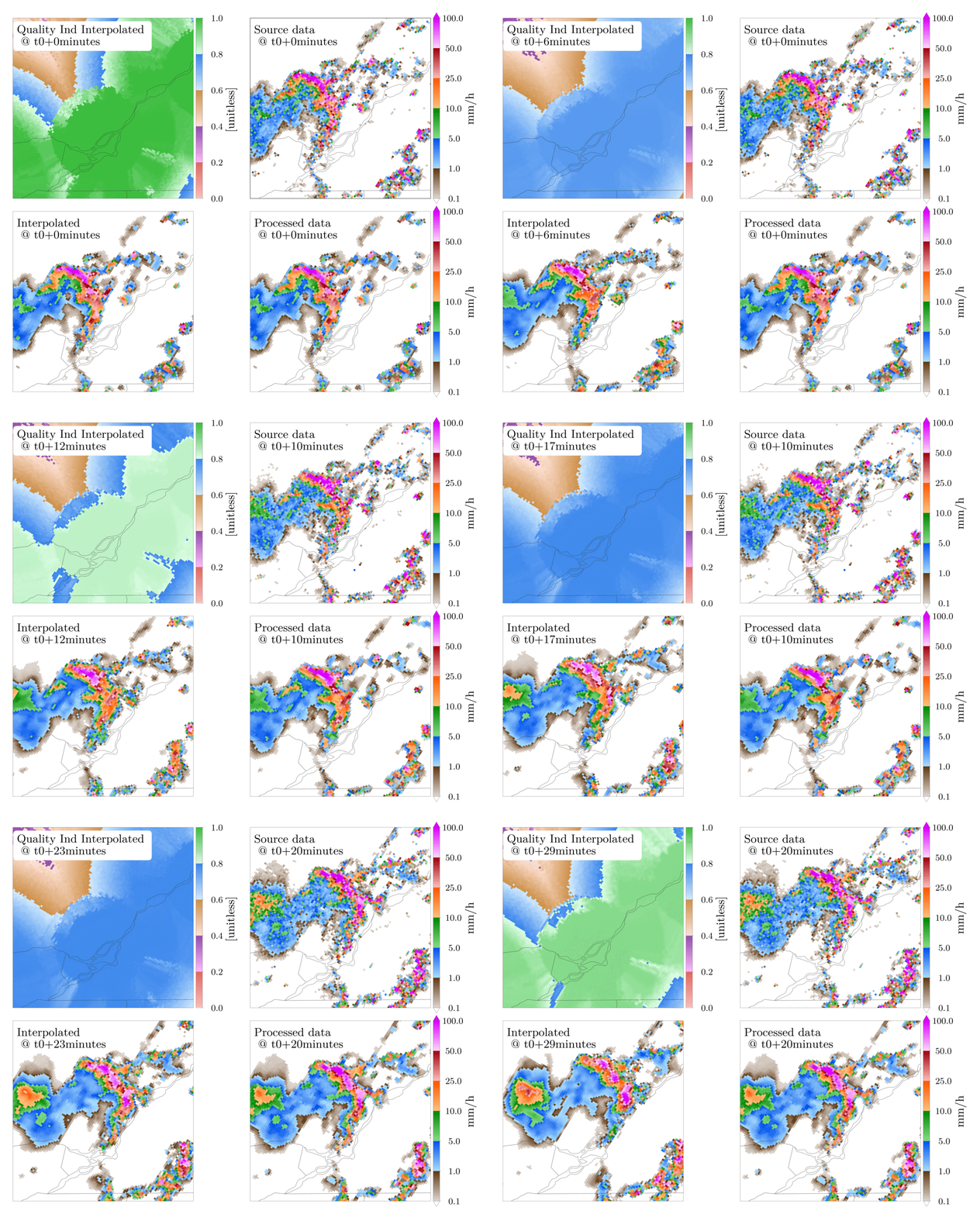
This section demonstrates the processing of a batch of observations in one call to the obs_process function. The results are then displayed in the form of a short animation.
Lets start with the required imports and directory setup:
    import os
    import datetime
    import subprocess
    import glob
    import shutil
    import numpy as np
    import matplotlib as mpl
    import matplotlib.pyplot as plt
    import cartopy.crs as ccrs
    import cartopy.feature as cfeature
    import domutils.legs as legs
    import domutils.geo_tools as geo_tools
    import domutils.radar_tools as radar_tools
    import domcmc.fst_tools as fst_tools
    import domutils._py_tools as py_tools

    #setting up directories
    test_data_dir    = setup_test_paths['test_data_dir']
    test_results_dir = setup_test_paths['test_results_dir']

    generated_files_dir  = os.path.join(test_results_dir, 'generated_files',   'test_radar_time_interpolation')
    generated_figure_dir = os.path.join(test_results_dir, 'generated_figures', 'test_radar_time_interpolation')
    reference_figure_dir = os.path.join(test_data_dir,    'reference_figures', 'test_radar_time_interpolation')

    py_tools.parallel_mkdir(generated_files_dir)
    py_tools.parallel_mkdir(generated_figure_dir)

    # matplotlib global settings
    dpi = 400
    mpl.rcParams.update({
        'font.family': 'Latin Modern Roman',
        'font.size': 32,
        'axes.titlesize': 32,
        'axes.labelsize': 32,
        'xtick.labelsize': 25,
        'ytick.labelsize': 25,
        'legend.fontsize': 25,
        'figure.dpi': dpi,
        'savefig.dpi': dpi,
        })
obs_process is a python script callable from the shell such as:
#process data with time interpolation
python -m domutils.radar_tools.obs_process    \
          --input_t0         202206150800     \
          --input_tf         202206160000     \
          --input_dt         10               \
          --output_t0        202206150900     \
          --output_tf        202206160000     \
          --output_dt        1                \
          --t_interp_method  'nowcast'        \
          ...
However, for this example we will be running directly from Python with arguments provided by the attributes of a simple object.
    # a class that mimics the output of argparse
    class ArgsClass():
        input_t0                 = '202205212050'
        input_tf                 = '202205212140'
        input_dt                 = '10M'
        output_t0                = '202205212110'
        output_tf                = '202205212140'
        output_dt                = '1M'
        interp_max_dt            = 'None'
        output_file_format       = 'fst'
        complete_dataset         = 'False'
        t_interp_method          = 'nowcast'
        input_data_dir           = os.path.join(test_data_dir, 'odimh5_radar_composites')
        input_file_struc         = '%Y/%m/%d/qcomp_%Y%m%d%H%M.h5'
        h5_latlon_file           = os.path.join(test_data_dir, 'radar_continental_2.5km_2882x2032.pickle')
        sample_pr_file           = os.path.join(test_data_dir, 'hrdps_5p1_prp0.fst')
        ncores                   = 40    # use as many cpus as you have on your system
        preproc_median_filt      = '3'
        nowcast_median_filt      = '3'
        output_dir               = os.path.join(generated_files_dir, 'obs_process_t_interp')
        output_file_struc        = '%Y%m%d%H%M.fst'
        log_level                = 'WARNING'
The processing of observations and time interpolation is done in one simple function call.
    # all the arguments are attributes of the args object
    args = ArgsClass()

    # observations are processed here
    # the output are files in different directories
    radar_tools.obs_process(args)
To make an animation showing the time-interpolated dat, we first define a function for plotting each individual panels.
    def plot_panel(data,
                   fig, ax_pos, title,
                   proj_aea,
                   proj_obj, colormap,
                   plot_palette=None,
                   pal_units=None,
                   show_artefacts=False):

        ax = fig.add_axes(ax_pos, projection=proj_aea)
        ax.set_extent(proj_obj.rotated_extent, crs=proj_aea)
        dum = ax.annotate(title, size=32,
                          xy=(.022, .85), xycoords='axes fraction',
                          bbox=dict(boxstyle="round", fc='white', ec='white'))

        # projection from data space to image space
        projected_data = proj_obj.project_data(data)

        # plot data & palette
        colormap.plot_data(ax=ax, data=projected_data,
                           palette=plot_palette,
                           pal_units=pal_units, pal_format='{:5.1f}',
                           equal_legs=True)

        # add political boundaries
        ax.add_feature(cfeature.STATES.with_scale('10m'), linewidth=0.5, edgecolor='0.2')

        # show artefacts in accumulation plots
        if show_artefacts:
            ax2 = fig.add_axes(ax_pos)
            ax2.set_xlim((0.,1.))
            ax2.set_ylim((0.,1.))
            ax2.patch.set_alpha(0.0)
            ax2.set_axis_off()
            for x0, y0, dx in [(.17,.75,.1), (.26,.79,.1), (.36,.83,.1)]:
                ax2.arrow(x0, y0, dx, -.03,
                          width=0.015, facecolor='red', edgecolor='black',
                          head_width=3*0.01, linewidth=2.)
We now setup the general characteristics of the figure being generated. See Legs Tutorial for information on the definition of color mapping objects.
    #pixel density of each panel
    ratio = 1.
    hpix = 600.       #number of horizontal pixels
    vpix = ratio*hpix #number of vertical pixels
    img_res = (int(hpix),int(vpix))

    #size of image to plot
    fig_w = 19.                    #size of figure
    fig_h = 15.7                   #size of figure
    rec_w = 7./fig_w               #size of axes
    rec_h = ratio*(rec_w*fig_w)/fig_h #size of axes
    sp_w = .5/fig_w                #space between panel and border
    sp_m = 2.2/fig_w               #space between panels
    sp_h = .5/fig_h                #space between panels

    # color mapping object
    range_arr = [.1,1.,5.,10.,25.,50.,100.]
    missing = -9999.
    # colormap object for precip rates
    pr_colormap = legs.PalObj(range_arr=range_arr,
                              n_col=6,
                              over_high='extend', under_low='white',
                              excep_val=missing,
                              excep_col='grey_200')
    # colormap for QI index
    pastel = [ [[255,190,187],[230,104, 96]],  #pale/dark red
               [[255,185,255],[147, 78,172]],  #pale/dark purple
               [[255,227,215],[205,144, 73]],  #pale/dark brown
               [[210,235,255],[ 58,134,237]],  #pale/dark blue
               [[223,255,232],[ 61,189, 63]] ] #pale/dark green
    qi_colormap = legs.PalObj(range_arr=[0., 1.],
                              dark_pos='high',
                              color_arr=pastel,
                              excep_val=[missing,0.],
                              excep_col=['grey_220','white'])

    #setup cartopy projection
    ##250km around Blainville radar
    pole_latitude=90.
    pole_longitude=0.
    lat_0 = 46.
    delta_lat = 2.18/2.
    lon_0 = -73.75
    delta_lon = 3.12/2.
    map_extent=[lon_0-delta_lon, lon_0+delta_lon, lat_0-delta_lat, lat_0+delta_lat]
    proj_aea = ccrs.RotatedPole(pole_latitude=pole_latitude, pole_longitude=pole_longitude)

    # get lat/lon of input data from one of the h5 files
    dum_h5_file = os.path.join(test_data_dir, 'odimh5_radar_composites', '2022/05/21/qcomp_202205212100.h5')
    input_ll    = radar_tools.read_h5_composite(dum_h5_file, latlon=True)
    input_lats  = input_ll['latitudes']
    input_lons  = input_ll['longitudes']

    # get lat/lon of output data
    output_ll = fst_tools.get_data(args.sample_pr_file, var_name='PR', latlon=True)
    output_lats = output_ll['lat']
    output_lons = output_ll['lon']

    # instantiate projection object for input data
    input_proj_obj = geo_tools.ProjInds(src_lon=input_lons, src_lat=input_lats,
                                        extent=map_extent, dest_crs=proj_aea, image_res=img_res)

    # instantiate projection object for output data
    output_proj_obj = geo_tools.ProjInds(src_lon=output_lons, src_lat=output_lats,
                                         extent=map_extent, dest_crs=proj_aea, image_res=img_res)
Now, we make individual frames of the animation.
    this_frame = 1
    t0 = datetime.datetime(2022,5,21,21,10)
    source_deltat = [0, 10, 20]         # minutes
    interpolated_deltat = np.arange(10) # minutes
    for src_dt in source_deltat:
        source_t_offset = datetime.timedelta(seconds=src_dt*60.)
        source_valid_time = t0 + source_t_offset

        for interpolated_dt in interpolated_deltat:
            interpolated_t_offset = datetime.timedelta(seconds=interpolated_dt*60.)
            interpolated_valid_time = (t0 + source_t_offset) + interpolated_t_offset

            # instantiate figure
            fig = plt.figure(figsize=(fig_w,fig_h))

            # source data on original grid
            dat_dict = radar_tools.get_instantaneous(desired_quantity='precip_rate',
                                                     valid_date=source_valid_time,
                                                     data_path=args.input_data_dir,
                                                     data_recipe=args.input_file_struc)
            x0 = sp_w + rec_w + sp_m
            y0 = 2.*sp_h + rec_h
            ax_pos = [x0, y0, rec_w, rec_h]
            title = f'Source data \n @ t0+{src_dt}minutes'
            plot_panel(dat_dict['precip_rate'],
                       fig, ax_pos, title,
                       proj_aea,
                       input_proj_obj, pr_colormap,
                       plot_palette='right',
                       pal_units='mm/h')

            # processed data on destination grid
            dat_dict = radar_tools.get_instantaneous(desired_quantity='precip_rate',
                                                     valid_date=source_valid_time,
                                                     data_path=os.path.join(args.output_dir, 'processed'),
                                                     data_recipe=args.output_file_struc)
            x0 = sp_w + rec_w + sp_m
            y0 = sp_h
            ax_pos = [x0, y0, rec_w, rec_h]
            title = f'Processed data \n @ t0+{src_dt}minutes'
            plot_panel(dat_dict['precip_rate'],
                       fig, ax_pos, title,
                       proj_aea,
                       output_proj_obj, pr_colormap,
                       plot_palette='right',
                       pal_units='mm/h')

            # Time interpolated data
            dat_dict = radar_tools.get_instantaneous(desired_quantity='precip_rate',
                                                     valid_date=interpolated_valid_time,
                                                     data_path=args.output_dir,
                                                     data_recipe=args.output_file_struc)
            x0 = sp_w
            y0 = sp_h
            ax_pos = [x0, y0, rec_w, rec_h]
            title = f'Interpolated \n @ t0+{src_dt+interpolated_dt}minutes'
            plot_panel(dat_dict['precip_rate'],
                       fig, ax_pos, title,
                       proj_aea,
                       output_proj_obj, pr_colormap)

            # quality index is also interpolated using nowcasting
            x0 = sp_w
            y0 = 2.*sp_h + rec_h
            ax_pos = [x0, y0, rec_w, rec_h]
            title = f'Quality Ind Interpolated \n @ t0+{src_dt+interpolated_dt}minutes'
            plot_panel(dat_dict['total_quality_index'],
                       fig, ax_pos, title,
                       proj_aea,
                       output_proj_obj, qi_colormap,
                       plot_palette='right',
                       pal_units='[unitless]')

            # save output
            fig_name = os.path.join(generated_figure_dir, f'{this_frame:02}_time_interpol_demo_plain.png')
            plt.savefig(fig_name)
            plt.close(fig)
            print(f'done with {fig_name}')

            # use "convert" to make a gif out of the png
            cmd = ['convert', fig_name, '-geometry', '15%', '-quantize', 'transparent', '-dither', 'FloydSteinberg', '-colors', '256',  fig_name.replace('png', 'gif')]
            process = subprocess.Popen(cmd, stdout=subprocess.PIPE)
            output, error = process.communicate()

            # we don't need the original png anymore
            os.remove(fig_name)

            this_frame += 1
Finally, an animated gif is constructed from the frames we just made,
    this_frame = 1
    t0 = datetime.datetime(2022,5,21,21,10)
    source_deltat = [0, 10, 20]         # minutes
    interpolated_deltat = np.arange(10) # minutes
    for src_dt in source_deltat:
        source_t_offset = datetime.timedelta(seconds=src_dt*60.)
        source_valid_time = t0 + source_t_offset

        for interpolated_dt in interpolated_deltat:
            interpolated_t_offset = datetime.timedelta(seconds=interpolated_dt*60.)
            interpolated_valid_time = (t0 + source_t_offset) + interpolated_t_offset

            # instantiate figure
            fig = plt.figure(figsize=(fig_w,fig_h))

            # source data on original grid
            dat_dict = radar_tools.get_instantaneous(desired_quantity='precip_rate',
                                                     valid_date=source_valid_time,
                                                     data_path=args.input_data_dir,
                                                     data_recipe=args.input_file_struc)
            x0 = sp_w + rec_w + sp_m
            y0 = 2.*sp_h + rec_h
            ax_pos = [x0, y0, rec_w, rec_h]
            title = f'Source data \n @ t0+{src_dt}minutes'
            plot_panel(dat_dict['precip_rate'],
                       fig, ax_pos, title,
                       proj_aea,
                       input_proj_obj, pr_colormap,
                       plot_palette='right',
                       pal_units='mm/h')

            # processed data on destination grid
            dat_dict = radar_tools.get_instantaneous(desired_quantity='precip_rate',
                                                     valid_date=source_valid_time,
                                                     data_path=os.path.join(args.output_dir, 'processed'),
                                                     data_recipe=args.output_file_struc)
            x0 = sp_w + rec_w + sp_m
            y0 = sp_h
            ax_pos = [x0, y0, rec_w, rec_h]
            title = f'Processed data \n @ t0+{src_dt}minutes'
            plot_panel(dat_dict['precip_rate'],
                       fig, ax_pos, title,
                       proj_aea,
                       output_proj_obj, pr_colormap,
                       plot_palette='right',
                       pal_units='mm/h')

            # Time interpolated data
            dat_dict = radar_tools.get_instantaneous(desired_quantity='precip_rate',
                                                     valid_date=interpolated_valid_time,
                                                     data_path=args.output_dir,
                                                     data_recipe=args.output_file_struc)
            x0 = sp_w
            y0 = sp_h
            ax_pos = [x0, y0, rec_w, rec_h]
            title = f'Interpolated \n @ t0+{src_dt+interpolated_dt}minutes'
            plot_panel(dat_dict['precip_rate'],
                       fig, ax_pos, title,
                       proj_aea,
                       output_proj_obj, pr_colormap)

            # quality index is also interpolated using nowcasting
            x0 = sp_w
            y0 = 2.*sp_h + rec_h
            ax_pos = [x0, y0, rec_w, rec_h]
            title = f'Quality Ind Interpolated \n @ t0+{src_dt+interpolated_dt}minutes'
            plot_panel(dat_dict['total_quality_index'],
                       fig, ax_pos, title,
                       proj_aea,
                       output_proj_obj, qi_colormap,
                       plot_palette='right',
                       pal_units='[unitless]')

            # save output
            fig_name = os.path.join(generated_figure_dir, f'{this_frame:02}_time_interpol_demo_plain.png')
            plt.savefig(fig_name)
            plt.close(fig)
            print(f'done with {fig_name}')

            # use "convert" to make a gif out of the png
            cmd = ['convert', fig_name, '-geometry', '15%', '-quantize', 'transparent', '-dither', 'FloydSteinberg', '-colors', '256',  fig_name.replace('png', 'gif')]
            process = subprocess.Popen(cmd, stdout=subprocess.PIPE)
            output, error = process.communicate()

            # we don't need the original png anymore
            os.remove(fig_name)

            this_frame += 1
Accumulations from time interpolated data
Using nowcasting for time interpolation can be advantageous when computing accumulations from source data available at discrete times. In the example below, we compare accumulations obtained from the source data to accumulations obtained from the time interpolated data.
    end_date = datetime.datetime(2022,5,21,21,40, tzinfo=datetime.timezone.utc)
    duration = 30 # minutes

    # instantiate figure
    fig = plt.figure(figsize=(fig_w,fig_h))

    # make accumulation from source data
    dat_dict = radar_tools.get_accumulation(end_date=end_date,
                                            duration=duration,
                                            input_dt=10., # minutes
                                            data_path=args.input_data_dir,
                                            data_recipe=args.input_file_struc)
    x0 = 2.*sp_w + rec_w
    y0 = 2.*sp_h + rec_h
    ax_pos = [x0, y0, rec_w, rec_h]
    title = 'Accumulation from \n source data'
    plot_panel(dat_dict['accumulation'],
               fig, ax_pos, title,
               proj_aea,
               input_proj_obj, pr_colormap,
               plot_palette='right',
               pal_units='mm',
               show_artefacts=True)

    # make accumulation from processed data
    dat_dict = radar_tools.get_accumulation(end_date=end_date,
                                            duration=duration,
                                            input_dt=10., # minutes
                                            data_path=os.path.join(args.output_dir, 'processed'),
                                            data_recipe=args.output_file_struc)
    x0 = 2.*sp_w + rec_w
    y0 = sp_h
    ax_pos = [x0, y0, rec_w, rec_h]
    title = 'Accumulation from \n processed data'
    plot_panel(dat_dict['accumulation'],
               fig, ax_pos, title,
               proj_aea,
               output_proj_obj, pr_colormap,
               plot_palette='right',
               pal_units='mm',
               show_artefacts=True)

    # make accumulation from time interpolated data
    dat_dict = radar_tools.get_accumulation(end_date=end_date,
                                            duration=duration,
                                            input_dt=1., # minutes
                                            data_path=args.output_dir,
                                            data_recipe=args.output_file_struc)
    x0 = sp_w
    y0 = sp_h
    ax_pos = [x0, y0, rec_w, rec_h]
    title = 'Accumulation from \n time interpolated data'
    plot_panel(dat_dict['accumulation'],
               fig, ax_pos, title,
               proj_aea,
               output_proj_obj, pr_colormap)

    # save output
    fig_name = os.path.join(generated_figure_dir, 'time_interpol_demo_accum_plain.svg')
    plt.savefig(fig_name)
    plt.close(fig)
The figure below shows 30 minutes precipitation accumulation computed from:
The source data every 10 minutes
The filtered data every 10 minutes
The time interpolated data every 1 minute
In the two panels on the right, the red arrows indicate artefacts that originate from the poor time resolution of the source data compared to the speed at which the bow echo propagates.
The accumulation on the left is constructed from the time-interpolated values every minute and does not display the displacement artefacts.
