Legs Tutorial
A leg can be defined as:
a portion of a trip
one section of a relay race
Here the race happens in data space and goes from - infinity to + infinity.
The general idea is to assign a number of distinct color mappings, hereafter called legs, to contiguous portions of this (quite large) range.
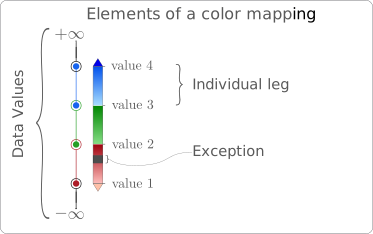
There can be any number of legs and what happens beyond the range of the color mapping must be specified explicitly. A mechanism is also provided for assigning colors to any number of exception values.
By doing so, it becomes easy to create and modify continuous, semi-continuous, categorical and divergent color mappings.
This tutorial demonstrates how to construct custom color mappings. Elements covered include:
Very basic color mapping
For this tutorial, lets start by making data and setting up figure information.
    import os
    import numpy as np
    import scipy.signal
    import matplotlib.pyplot as plt
    import matplotlib as mpl
    import domutils.legs as legs
    import domutils._py_tools as py_tools

    #setting up directories
    test_data_dir    = setup_test_paths['test_data_dir']
    test_results_dir = setup_test_paths['test_results_dir']

    reference_figure_dir = os.path.join(test_data_dir,    'reference_figures', 'test_legs_tutorial')
    generated_figure_dir = os.path.join(test_results_dir, 'generated_figures', 'test_legs_tutorial')

    py_tools.parallel_mkdir(generated_figure_dir)

    #Gaussian bell mock data
    npts = 1024
    half_npts = int(npts/2)
    x = np.linspace(-1., 1, half_npts+1)
    y = np.linspace(-1., 1, half_npts+1)
    xx, yy = np.meshgrid(x, y)
    gauss_bulge = np.exp(-(xx**2 + yy**2) / .6**2)

    #radar looking mock data
    sigma1 = .03
    sigma2 = .25
    np.random.seed(int(3.14159*100000))
    rand = np.random.normal(size=[npts,npts])
    xx, yy = np.meshgrid(np.linspace(-1.,1.,num=half_npts),np.linspace(1.,-1.,num=half_npts))
    kernel1 = np.exp(-1.*np.sqrt(xx**2.+yy**2.)/.02)
    kernel2 = np.exp(-1.*np.sqrt(xx**2.+yy**2.)/.15)
    reflectivity_like = (   scipy.signal.fftconvolve(rand,kernel1,mode='valid')
                          + scipy.signal.fftconvolve(rand,kernel2,mode='valid') )
    reflectivity_like = ( reflectivity_like
                          / np.max(np.absolute(reflectivity_like.max()))
                          * 62. )

    # figure properties
    mpl.rcParams.update({'font.size': 18})
    mpl.rcParams.update({'font.family':'Latin Modern Roman'})
    rec_w = 4.           #size of axes
    rec_h = 4.           #size of axes
    sp_w  = 2.           #horizontal space between axes
    sp_h  = 1.           #vertical space between axes

    # a function for formatting axes
    def format_axes(ax):
        for axis in ['top','bottom','left','right']:
            ax.spines[axis].set_linewidth(.3)
        limits = (-1.,1.)           #data extent for axes
        dum = ax.set_xlim(limits)   # "dum =" to avoid printing output
        dum = ax.set_ylim(limits)
        ticks  = [-1.,0.,1.]        #tick values
        dum = ax.set_xticks(ticks)
        dum = ax.set_yticks(ticks)
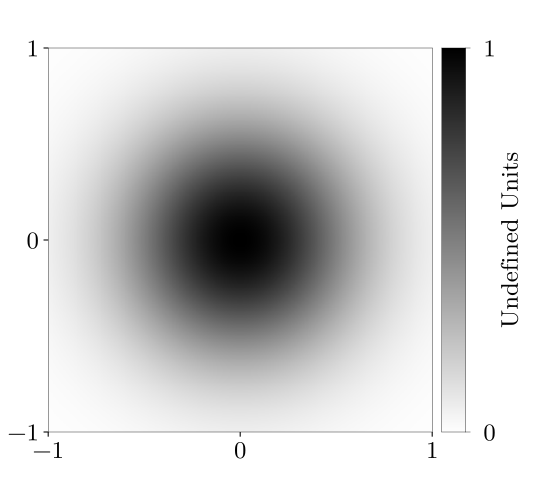
The default color mapping applies a black and wite gradient in the interval [0,1].
    fig_w, fig_h = 5.6, 5.#size of figure
    fig = plt.figure(figsize=(fig_w, fig_h))
    x0, y0 = .5/fig_w , .5/fig_h
    ax = fig.add_axes([x0,y0,rec_w/fig_w,rec_h/fig_h])
    format_axes(ax)

    #instantiate default color mapping
    mapping = legs.PalObj()

    #plot data & palette
    mapping.plot_data(ax=ax,data=gauss_bulge,
                      palette='right',
                      pal_format='{:2.0f}')


    generated_figure = os.path.join(generated_figure_dir, 'default.svg')
    plt.savefig(generated_figure)
Data values above and below the color palette
The default behavior is to throw an error if data values are found beyond the range of of the color palette. The following code will fail and give you suggestions as to what to do.
    #extend range of data to plot beyond 1.0
    extended_gauss_bulge = 1.4 * gauss_bulge - 0.2 # data range is now [-.2, 1.2]

    with pytest.raises(RuntimeError):
        mapping.plot_data(ax=ax,data=extended_gauss_bulge,
                      palette='right', pal_format='{:2.0f}')
Traceback (most recent call last):
  File ".../envs/domutils_dev/lib/python3.7/doctest.py", line 1330, in __run
    compileflags, 1), test.globs)
  File "<doctest legsTutorial.rst[35]>", line 2, in <module>
    palette='right', pal_format='{:2.0f}')
  File ".../python/packages/domutils_package/domutils/legs/legs.py", line 405, in plot_data
    out_rgb = self.to_rgb(rdata)
  File ".../python/packages/domutils_package/domutils/legs/legs.py", line 473, in to_rgb
    validate.no_unmapped(data_flat, action_record, self.lows, self.highs)
  File ".../python/packages/domutils_package/domutils/legs/validation_tools/no_unmapped.py", line 103, in no_unmapped
    raise RuntimeError(err_mess)
RuntimeError:

Found data point(s) smaller than the minimum of an exact palette:
  [-0.19458771 -0.19446921 -0.19434859 -0.19434811 -0.19422583]...


Found data point(s) larger than the maximum of an exact palette:
  [1.00004429 1.00055305 1.00060393 1.0008584  1.00101111]...


One possibility is that the data value(s) exceed the palette
while they should not.
   For example: correlation coefficients greater than one.
   In this case, fix your data.

Another possibility is that data value(s) is (are) expected
above/below the palette.
In this case:
  1- Use the "over_under","over_high" or "under_low" keywords to explicitly
     assign a color to data values below/above the palette.
  2- Assign a color to exception values using the "excep_val" and "excep_col" keywords.
     For example: excep_val=-9999., excep_col="red".
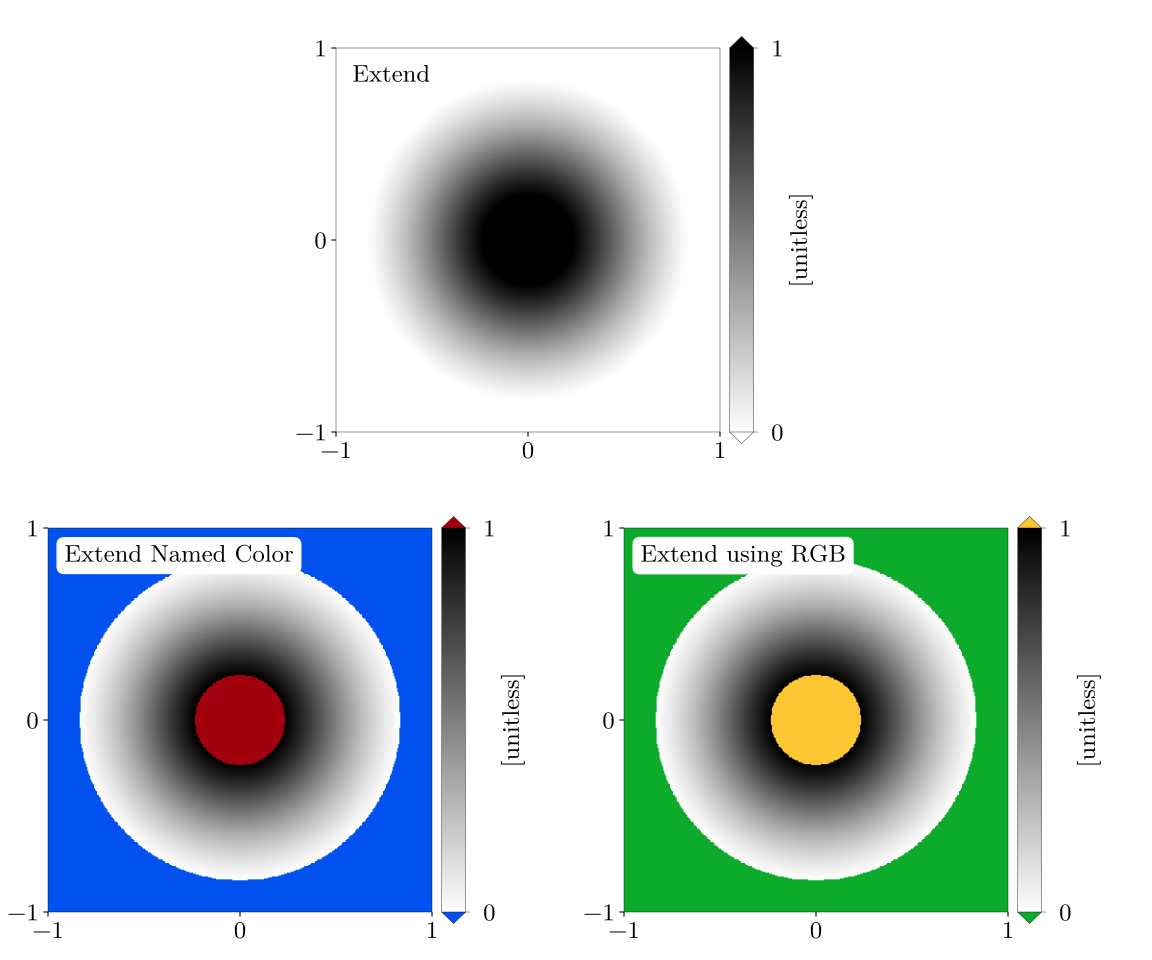
Lets assume that we expected data values to exceed the [0,1] range where the color palette is defined. Then we should use the keywords over_under or under_low and over_high to avoid errors.
    fig_w, fig_h = 12., 10.
    fig = plt.figure(figsize=(fig_w, fig_h))


    #mapping which extends the end-point color beyond the palette range
    x0, y0 = (.5+rec_w/2.+sp_w/2.)/fig_w , (.5+rec_h+sp_h)/fig_h
    ax1 = fig.add_axes([x0,y0,rec_w/fig_w,rec_h/fig_h])
    dum = ax1.annotate('Extend', size=18,
                       xy=(.17/rec_w, 3.65/rec_h), xycoords='axes fraction',
                       bbox=dict(boxstyle="round", fc='white', ec='white'))
    format_axes(ax1)
    mapping_ext = legs.PalObj(over_under='extend')
    mapping_ext.plot_data(ax=ax1,data=extended_gauss_bulge,
                          palette='right', pal_units='[unitless]',
                          pal_format='{:2.0f}')


    #mapping where end points are dealt with separately
    x0, y0 = .5/fig_w , .5/fig_h
    ax2 = fig.add_axes([x0,y0,rec_w/fig_w,rec_h/fig_h])
    dum = ax2.annotate('Extend Named Color', size=18,
                       xy=(.17/rec_w, 3.65/rec_h), xycoords='axes fraction',
                       bbox=dict(boxstyle="round", fc='white', ec='white'))
    format_axes(ax2)
    mapping_ext_2 = legs.PalObj(over_high='dark_red', under_low='dark_blue')
    mapping_ext_2.plot_data(ax=ax2,data=extended_gauss_bulge,
                            palette='right', pal_units='[unitless]',
                            pal_format='{:2.0f}')


    #as for all color specification, RBG values also work
    x0, y0 = (.5+rec_w+sp_w)/fig_w , .5/fig_h
    ax3 = fig.add_axes([x0,y0,rec_w/fig_w,rec_h/fig_h])
    dum = ax3.annotate('Extend using RGB', size=18,
                       xy=(.17/rec_w, 3.65/rec_h), xycoords='axes fraction',
                       bbox=dict(boxstyle="round", fc='white', ec='white'))
    format_axes(ax3)

    mapping_ext_3 = legs.PalObj(over_high=[255,198, 51], under_low=[ 13,171, 43])
    mapping_ext_3.plot_data(ax=ax3,data=extended_gauss_bulge,
                            palette='right', pal_units='[unitless]',
                            pal_format='{:2.0f}')


    generated_figure = os.path.join(generated_figure_dir, 'default_extend.svg')
    plt.savefig(generated_figure)
Exceptions
Exception values to a color mapping come in many forms:
Missing values from a dataset
Points outside of a simulation domain
The zero value when showing the difference between two things
Water in a topographical map / Land in vertical cross-sections
etc.
Being able to easily assign colors values allows for all figures of a given manuscript/article to show missing data with the same color.
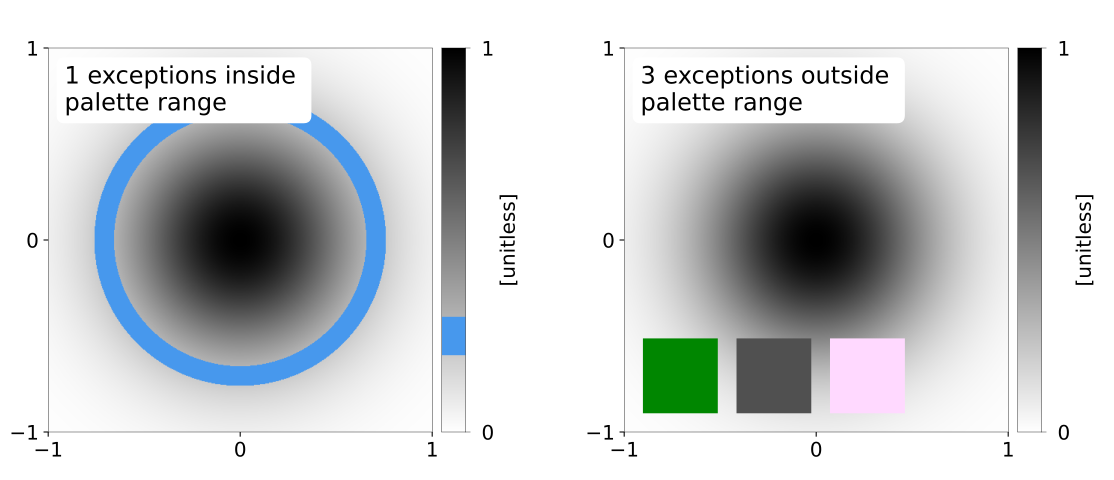
There can be any number of exceptions associated with a given color mapping. These exceptions have precedence over the regular color mapping and will show up in the associated color palette.
Data points that are outside of an exact color mapping but that are covered by an exception will not trigger an error.
    fig_w, fig_h = 12., 5.#size of figure
    fig = plt.figure(figsize=(fig_w, fig_h))


    #Lets assume that data values in the range [0.2,0.3] are special
    #make a mapping where these values are assigned a special color
    x0, y0 = .5/fig_w , .5/fig_h
    ax1 = fig.add_axes([x0,y0,rec_w/fig_w,rec_h/fig_h])
    dum = ax1.annotate('1 exceptions inside \npalette range', size=18,
                       xy=(.17/rec_w, 3.35/rec_h), xycoords='axes fraction',
                       bbox=dict(boxstyle="round", fc='white', ec='white'))
    format_axes(ax1)
    #data values in the range 0.25+-0.05 are assigned the color blue
    mapping_1_except = legs.PalObj(excep_val=[.25],
                                   excep_tol=[.05],
                                   excep_col=[ 71,152,237])
    mapping_1_except.plot_data(ax=ax1,data=gauss_bulge,
                               palette='right', pal_units='[unitless]',
                               pal_format='{:2.0f}')


    #exceptions are usefull for NoData, missing values, etc
    #lets assing exception values to the Gaussian Bulge data
    gauss_bulge_with_exceptions = np.copy(gauss_bulge)
    gauss_bulge_with_exceptions[388:488, 25:125] = -9999.
    gauss_bulge_with_exceptions[388:488,150:250] = -6666.
    gauss_bulge_with_exceptions[388:488,275:375] = -3333.

    x0, y0 = (.5+rec_w+sp_w)/fig_w , .5/fig_h
    ax2 = fig.add_axes([x0,y0,rec_w/fig_w,rec_h/fig_h])
    dum = ax2.annotate('3 exceptions outside \npalette range', size=18,
                       xy=(.17/rec_w, 3.35/rec_h), xycoords='axes fraction',
                       bbox=dict(boxstyle="round", fc='white', ec='white'))
    format_axes(ax2)
    #a mapping where 3 exceptions are specified
    #the defalut tolerance around specified value is 1e-3
    mapping_3_except = legs.PalObj(excep_val=[-9999.,      -6666.,    -3333.],
                                   excep_col=['dark_green','grey_80', 'light_pink'])
    mapping_3_except.plot_data(ax=ax2,data=gauss_bulge_with_exceptions,
                               palette='right', pal_units='[unitless]',
                               pal_format='{:2.0f}')


    generated_figure = os.path.join(generated_figure_dir, 'default_exceptions.svg')
    plt.savefig(generated_figure)
Specifying colors
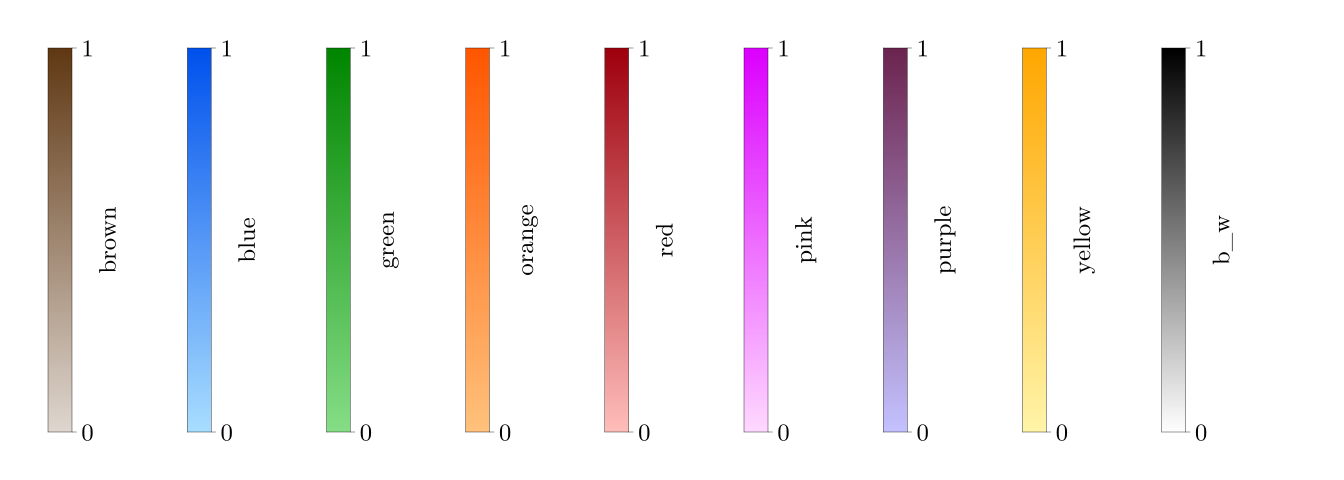
Up to nine legs using linear gradient mapping are specified by default. They can be called by name.
    pal_w  = .25     #width of palette
    pal_sp = 1.2     #space between palettes
    fig_w, fig_h = 14., 5.  #size of figure
    fig = plt.figure(figsize=(fig_w, fig_h))
    supported_colors = ['brown','blue','green','orange',
                        'red','pink','purple','yellow', 'b_w']
    for n, thisCol in enumerate(supported_colors):
        x0, y0 = (.5+n*(pal_w+pal_sp))/fig_w , .5/fig_h
        #color mapping with one color leg
        this_map = legs.PalObj(color_arr=thisCol)
        #plot palette only
        this_map.plot_palette(pal_pos=[x0,y0,pal_w/fig_w,rec_h/fig_h],
                              pal_units=thisCol,
                              pal_format='{:1.0f}')
    generated_figure = os.path.join(generated_figure_dir, 'default_linear_legs.svg')
    plt.savefig(generated_figure)
Semi-continuous, semi-quantitative color mappings
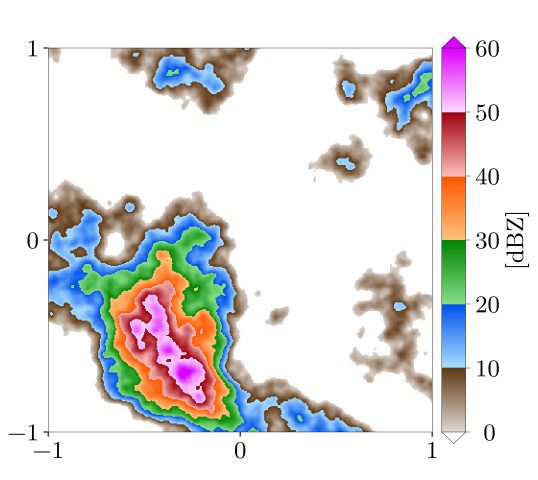
The keyword n_col will create a palette from the default legs in the order in which they appear above.
    fig_w, fig_h = 5.6, 5.#size of figure
    fig = plt.figure(figsize=(fig_w, fig_h))
    x0, y0 = .5/fig_w , .5/fig_h
    ax = fig.add_axes([x0,y0,rec_w/fig_w,rec_h/fig_h])
    format_axes(ax)
    #mapping with 6 color legs
    mapping_default_6_colors = legs.PalObj(range_arr=[0.,60], n_col=6,
                                           over_high='extend',
                                           under_low='white')
    mapping_default_6_colors.plot_data(ax=ax,data=reflectivity_like,
                                       palette='right', pal_units='[dBZ]',
                                       pal_format='{:2.0f}')
    generated_figure = os.path.join(generated_figure_dir, 'default_6cols.svg')
    plt.savefig(generated_figure)
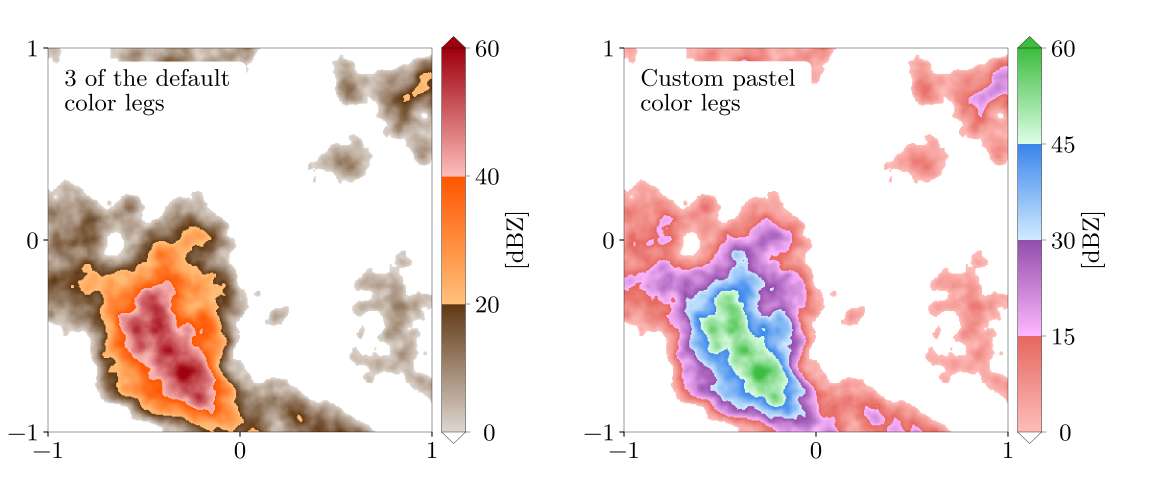
The keyword color_arr can be used to make a mapping from the default color legs in whatever order. It can also be used to make custom color legs from RGB values. By default linear interpolation is used between the provided RGB.
    fig_w, fig_h = 12., 5.#size of figure
    fig = plt.figure(figsize=(fig_w, fig_h))


    #mapping with 3 of the default color legs
    x0, y0 = .5/fig_w , .5/fig_h
    ax1 = fig.add_axes([x0,y0,rec_w/fig_w,rec_h/fig_h])
    dum = ax1.annotate('3 of the default \ncolor legs', size=18,
                       xy=(.17/rec_w, 3.35/rec_h), xycoords='axes fraction',
                       bbox=dict(boxstyle="round", fc='white', ec='white'))
    format_axes(ax1)
    mapping_3_colors = legs.PalObj(range_arr=[0.,60],
                                   color_arr=['brown','orange','red'],
                                   over_high='extend',
                                   under_low='white')
    mapping_3_colors.plot_data(ax=ax1,data=reflectivity_like,
                               palette='right', pal_units='[dBZ]',
                               pal_format='{:2.0f}')


    #mapping with custom pastel color legs
    x0, y0 = (.5+rec_w+sp_w)/fig_w , .5/fig_h
    ax2 = fig.add_axes([x0,y0,rec_w/fig_w,rec_h/fig_h])
    dum = ax2.annotate('Custom pastel \ncolor legs', size=18,
                       xy=(.17/rec_w, 3.35/rec_h), xycoords='axes fraction',
                       bbox=dict(boxstyle="round", fc='white', ec='white'))
    format_axes(ax2)
    #Custom pastel colors
    pastel = [ [[255,190,187],[230,104, 96]],  #pale/dark red
               [[255,185,255],[147, 78,172]],  #pale/dark purple
               [[210,235,255],[ 58,134,237]],  #pale/dark blue
               [[223,255,232],[ 61,189, 63]] ] #pale/dark green
    mapping_pastel = legs.PalObj(range_arr=[0.,60],
                                 color_arr=pastel,
                                 over_high='extend',
                                 under_low='white')
    #plot data & palette
    mapping_pastel.plot_data(ax=ax2,data=reflectivity_like,
                             palette='right', pal_units='[dBZ]',
                             pal_format='{:2.0f}')


    generated_figure = os.path.join(generated_figure_dir, 'col_arr_demo.svg')
    plt.savefig(generated_figure)
Categorical, quantitative color mappings
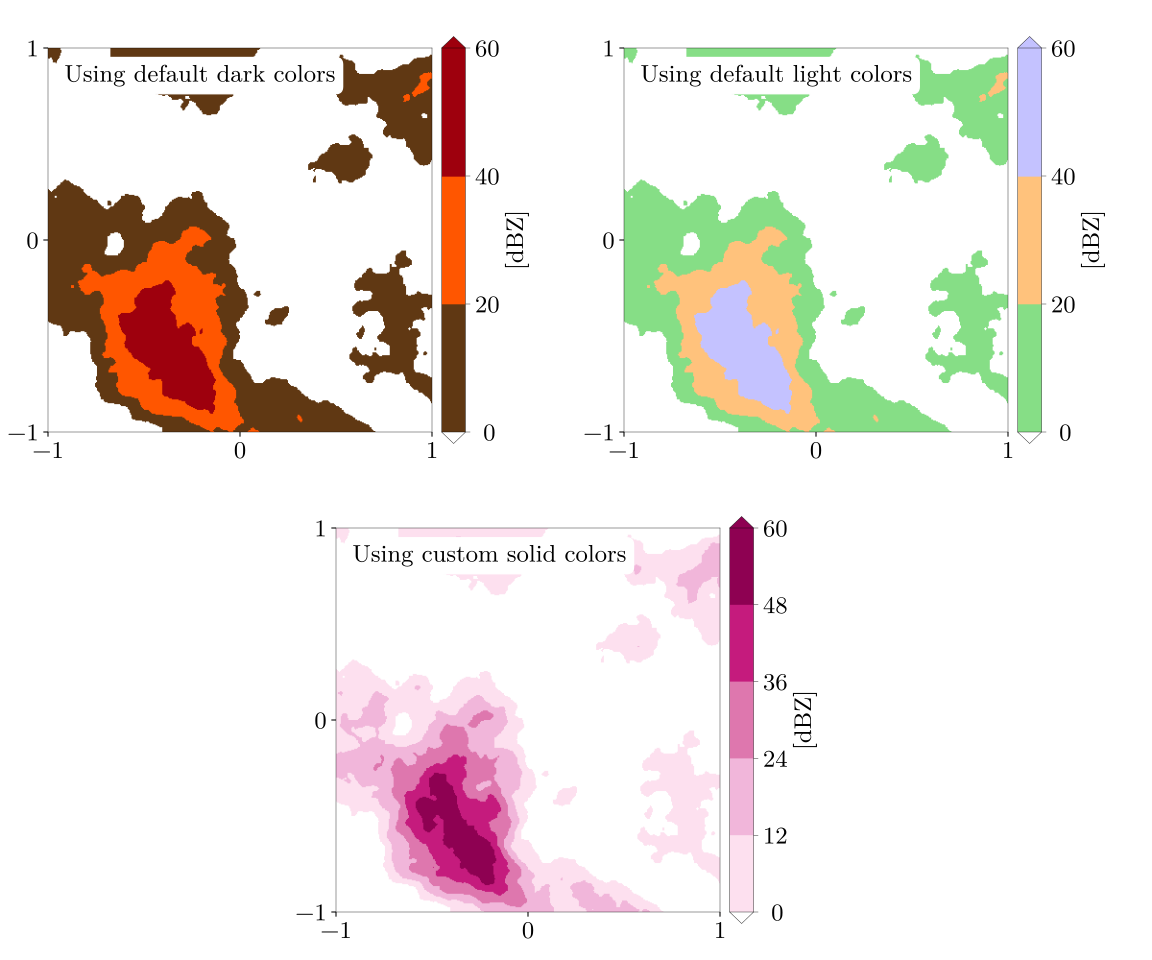
The keyword solid is used for generating categorical palettes.
    fig_w, fig_h = 12., 10.
    fig = plt.figure(figsize=(fig_w, fig_h))


    #mapping with solid dark colors
    x0, y0 = .5/fig_w , (.5+rec_h+sp_h)/fig_h
    ax1 = fig.add_axes([x0,y0,rec_w/fig_w,rec_h/fig_h])
    dum = ax1.annotate('Using default dark colors', size=18,
                       xy=(.17/rec_w, 3.65/rec_h), xycoords='axes fraction',
                       bbox=dict(boxstyle="round", fc='white', ec='white'))
    format_axes(ax1)
    mapping_solid_dark = legs.PalObj(range_arr=[0.,60],
                                     color_arr=['brown','orange','red'],
                                     solid='col_dark',
                                     over_high='extend',
                                     under_low='white')
    mapping_solid_dark.plot_data(ax=ax1,data=reflectivity_like,
                                 palette='right', pal_units='[dBZ]',
                                 pal_format='{:2.0f}')


    #mapping with solid light colors
    x0, y0 = (.5+rec_w+sp_w)/fig_w , (.5+rec_h+sp_h)/fig_h
    ax2 = fig.add_axes([x0,y0,rec_w/fig_w,rec_h/fig_h])
    dum = ax2.annotate('Using default light colors', size=18,
                       xy=(.17/rec_w, 3.65/rec_h), xycoords='axes fraction',
                       bbox=dict(boxstyle="round", fc='white', ec='white'))
    format_axes(ax2)
    mapping_solid_light = legs.PalObj(range_arr=[0.,60],
                                      color_arr=['green','orange','purple'],
                                      solid=    'col_light',
                                      over_high='extend',
                                      under_low='white')
    mapping_solid_light.plot_data(ax=ax2,data=reflectivity_like,
                                  palette='right', pal_units='[dBZ]',
                                  pal_format='{:2.0f}')


    #mapping with custom solid colors
    x0, y0 = (.5+rec_w/2.+sp_w/2.)/fig_w , .5/fig_h
    ax3 = fig.add_axes([x0,y0,rec_w/fig_w,rec_h/fig_h])
    dum = ax3.annotate('Using custom solid colors', size=18,
                       xy=(.17/rec_w, 3.65/rec_h), xycoords='axes fraction',
                       bbox=dict(boxstyle="round", fc='white', ec='white'))
    format_axes(ax3)
    #colors from www.colorbrewer2.org
    magenta =[ [253, 224, 239],  #pale magenta
               [241, 182, 218],
               [222, 119, 174],
               [197,  27, 125],
               [142,   1,  82] ] #dark magenta
    mapping_solid_custom = legs.PalObj(range_arr=[0.,60],
                                       color_arr= magenta,
                                       solid=    'supplied',
                                       over_high='extend',
                                       under_low='white')
    mapping_solid_custom.plot_data(ax=ax3,data=reflectivity_like,
                                   palette='right', pal_units='[dBZ]',
                                   pal_format='{:2.0f}')


    generated_figure = os.path.join(generated_figure_dir, 'solid_demo.svg')
    plt.savefig(generated_figure)
Divergent color mappings
The keyword dark_pos is useful for making divergent palettes.
    fig_w, fig_h = 12., 5.#size of figure
    fig = plt.figure(figsize=(fig_w, fig_h))


    # two color divergent mapping
    x0, y0 = .5/fig_w , .5/fig_h
    ax1 = fig.add_axes([x0,y0,rec_w/fig_w,rec_h/fig_h])
    dum = ax1.annotate('Divergent mapping \nusing defaul colors', size=18,
                       xy=(.17/rec_w, 3.35/rec_h), xycoords='axes fraction',
                       bbox=dict(boxstyle="round", fc='white', ec='white'))
    format_axes(ax1)
    mapping_div_2_colors = legs.PalObj(range_arr=[-50.,50],
                                       color_arr=['orange','blue'],
                                       dark_pos =['low',   'high'],
                                       over_under='extend')
    mapping_div_2_colors.plot_data(ax=ax1,data=reflectivity_like,
                                   palette='right', pal_units='[dBZ]',
                                   pal_format='{:2.0f}')


    #Custom pastel colors
    x0, y0 = (.5+rec_w+sp_w)/fig_w , .5/fig_h
    ax2 = fig.add_axes([x0,y0,rec_w/fig_w,rec_h/fig_h])
    dum = ax2.annotate('Divergent mapping with \ncustom color ', size=18,
                       xy=(.17/rec_w, 3.35/rec_h), xycoords='axes fraction',
                       bbox=dict(boxstyle="round", fc='white', ec='white'))
    format_axes(ax2)
    pastel = [ [[255,255,255],[147, 78,172]],  # white, purple
               [[255,255,255],[ 61,189, 63]] ] # white, green
    mapping_pastel = legs.PalObj(range_arr=[-50.,50],
                                 color_arr=pastel,
                                 dark_pos =['low','high'],
                                 over_under='extend')
    mapping_pastel.plot_data(ax=ax2,data=reflectivity_like,
                             palette='right', pal_units='[dBZ]',
                             pal_format='{:2.0f}')


    generated_figure = os.path.join(generated_figure_dir, 'dark_pos_demo.svg')
    plt.savefig(generated_figure)

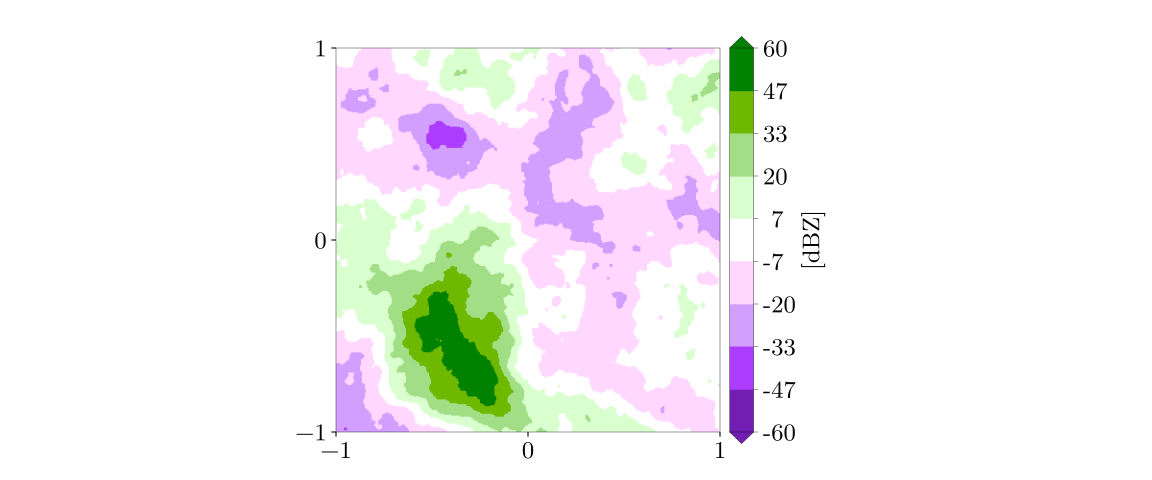
Quantitative divergent color mappings can naturally be made using the solid keyword.
    fig_w, fig_h = 12., 5.#size of figure
    fig = plt.figure(figsize=(fig_w, fig_h))


    #mapping with custom colors
    x0, y0 = (.5+rec_w/2.+sp_w/2.)/fig_w , .5/fig_h
    ax = fig.add_axes([x0,y0,rec_w/fig_w,rec_h/fig_h])
    format_axes(ax)

    # these colors were defined using inkscape.
    # www.colorbrewer2.org is also a great place for getting such color mappings
    green_purple =[ [114,  30, 179],  #dark purple
                    [172,  61, 255],
                    [210, 159, 255],
                    [255, 215, 255],  #pale purple
                    [255, 255, 255],  #white
                    [218, 255, 207],  #pale green
                    [162, 222, 134],
                    [111, 184,   0],
                    [  0, 129,   0] ] #dark green

    mapping_divergent_solid = legs.PalObj(range_arr=[-60.,60],
                                          color_arr= green_purple,
                                          solid=    'supplied',
                                          over_under='extend')
    mapping_divergent_solid.plot_data(ax=ax,data=reflectivity_like,
                                      palette='right', pal_units='[dBZ]',
                                      pal_format='{:2.0f}')


    generated_figure = os.path.join(generated_figure_dir, 'solid_divergent.svg')
    plt.savefig(generated_figure)
Colors legs covering unequal range intervals
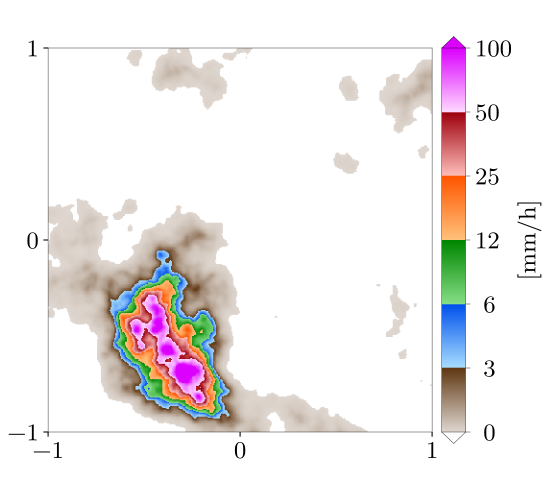
So far, the keyword range_arr has been used to determine the range of the entire color mapping. It can also be used to define color legs with different extents.
    #ensure strictky +ve reflectivity values
    reflectivity_like_pve = np.where(reflectivity_like <= 0., 0., reflectivity_like)
    #convert reflectivity in dBZ to precipitation rates in mm/h (Marshall-Palmer, 1949)
    precip_rate =  10.**(reflectivity_like_pve/16.) / 27.424818

    fig_w, fig_h = 5.8, 5.#size of figure
    fig = plt.figure(figsize=(fig_w, fig_h))


    #mapping with color legs spanning different ranges of values
    x0, y0 = .5/fig_w , .5/fig_h
    ax = fig.add_axes([x0,y0,rec_w/fig_w,rec_h/fig_h])
    format_axes(ax)
    mapping_diff_ranges = legs.PalObj(range_arr=[.1,3.,6.,12.,25.,50.,100.],
                                      n_col=6,
                                      over_high='extend',
                                      under_low='white')
    # the keyword "equal_legs" makes the legs have equal space in the palette even
    # when they cover different value ranges
    mapping_diff_ranges.plot_data(ax=ax,data=precip_rate,
                                  palette='right', pal_units='[mm/h]',
                                  pal_format='{:2.0f}',
                                  equal_legs=True)
    generated_figure = os.path.join(generated_figure_dir, 'different_ranges.svg')
    plt.savefig(generated_figure)
Separate plotting of data and palette
When multiple pannels are plotted, it is often convenient to separate the display of data form that of the palette. In this example, two color mappings are used first separately and then together.
    fig_w, fig_h = 12., 10.
    fig = plt.figure(figsize=(fig_w, fig_h))


    # black and white mapping
    # without the **palette** keyword, **plot_data** only plots data.
    x0, y0 = .5/fig_w , (.5+rec_h+sp_h)/fig_h
    ax1 = fig.add_axes([x0,y0,rec_w/fig_w,rec_h/fig_h])
    dum = ax1.annotate('Black & white mapping', size=18,
                       xy=(.17/rec_w, 3.65/rec_h), xycoords='axes fraction',
                       bbox=dict(boxstyle="round", fc='white', ec='white'))
    format_axes(ax1)
    mapping_bw = legs.PalObj(range_arr=[0.,1.], color_arr='b_w')
    mapping_bw.plot_data(ax=ax1,data=gauss_bulge)

    #get RGB image using the to_rgb method
    gauss_rgb = mapping_bw.to_rgb(gauss_bulge)


    #color mapping using 6 default linear color segments
    # this time, data is plotted by hand
    x0, y0 = (.5+rec_w+sp_w)/fig_w , (.5+rec_h+sp_h)/fig_h
    ax2 = fig.add_axes([x0,y0,rec_w/fig_w,rec_h/fig_h])
    dum = ax2.annotate('6 Colors', size=18,
                       xy=(.17/rec_w, 3.65/rec_h), xycoords='axes fraction',
                       bbox=dict(boxstyle="round", fc='white', ec='white'))
    format_axes(ax2)
    mapping_ref = legs.PalObj(range_arr=[0.,60],n_col=6, over_under='extend')
    reflectivity_rgb = mapping_ref.to_rgb(reflectivity_like)
    x1, x2 = ax2.get_xlim()
    y1, y2 = ax2.get_ylim()
    dum = ax2.imshow(reflectivity_rgb, interpolation='nearest',
                     origin='upper', extent=[x1,x2,y1,y2] )
    ax2.set_aspect('auto')  #force matplotlib to respect the axes that was defined


    #As a third panel, let's combine the two images
    x0, y0 = (.5+rec_w/2.)/fig_w , .5/fig_h
    ax3 = fig.add_axes([x0,y0,rec_w/fig_w,rec_h/fig_h])
    dum = ax3.annotate('combined image', size=18,
                       xy=(.17/rec_w, 3.65/rec_h), xycoords='axes fraction',
                       bbox=dict(boxstyle="round", fc='white', ec='white'))
    format_axes(ax3)

    #blend the two images by hand
    #image will be opaque where reflectivity > 0
    alpha = np.where(reflectivity_like >= 0., 1., 0.)
    alpha = np.where(np.logical_and(reflectivity_like >= 0., reflectivity_like < 10.), 0.1*reflectivity_like, alpha)
    combined_rgb = np.zeros(gauss_rgb.shape,dtype='uint8')
    for zz in np.arange(3):
        combined_rgb[:,:,zz] = (1. - alpha)*gauss_rgb[:,:,zz] + alpha*reflectivity_rgb[:,:,zz]

    #plot image w/ imshow
    x1, x2 = ax3.get_xlim()
    y1, y2 = ax3.get_ylim()
    dum = ax3.imshow(combined_rgb, interpolation='nearest',
                     origin='upper', extent=[x1,x2,y1,y2])
    ax3.set_aspect('auto')

    #plot palettes with the plot_palette method
    pal_w  = .25/fig_w   #width of palette
    x0, y0 = x0+rec_w/fig_w+.25/fig_w  , .5/fig_h
    mapping_bw.plot_palette(pal_pos=[x0,y0,pal_w,rec_h/fig_h],
                           pal_units='unitless',
                           pal_format='{:2.0f}')
    x0, y0 = x0+1.2/fig_w  , .5/fig_h
    mapping_ref.plot_palette(pal_pos=[x0,y0,pal_w,rec_h/fig_h],
                            pal_units='dBZ',
                            pal_format='{:3.0f}')


    generated_figure = os.path.join(generated_figure_dir, 'separate_data_palettes.svg')
    plt.savefig(generated_figure)
